Engine Monitoring
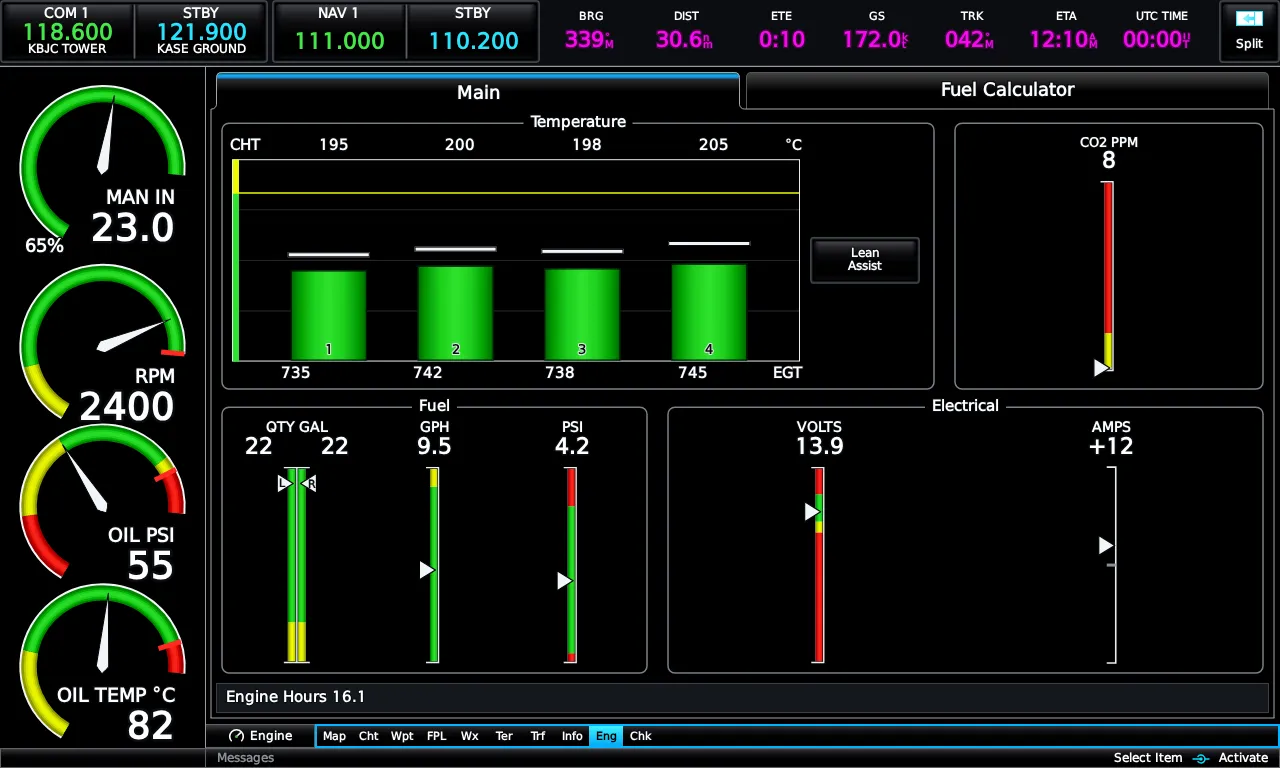
The EIS strip and the Engine page
Section titled “The EIS strip and the Engine page”The EIS strip rides along the edge of the display whenever engine data is configured; the full Engine page has two tabs — Main, laid out as the real unit’s grid of temperature, fuel, and electrical groups, and Fuel Calculator. Where the strip lives (PFD or MFD, left or right, combined with or separate from the engine page, narrow or wide) is all configurable under Setup → Display.
Airframe profiles
Section titled “Airframe profiles”Gauges are data-driven per aircraft — which gauges exist, their ranges, zones, and redlines. Three profiles ship: Cessna 172S Skyhawk, PA-28-181 Archer III, and Beechcraft A36 Bonanza (IO-550) — so the Skyhawk gets four cylinders and no manifold pressure, the Bonanza six and MP. The profile is chosen automatically from the aircraft your sim reports; an unrecognized aircraft gets a sensible generic-piston panel built from what the sim does report, rather than a mismatched one.
CAS messages
Section titled “CAS messages”Exceedances raise warning / caution / advisory messages on the CAS stack, with warning text flashing until you acknowledge it — touch the message (or press BACK). A message clears when its condition does, and re-annunciates if it comes back. Touching the CAS window opens the full message list.
Lean assist
Section titled “Lean assist”Touch Lean Assist on the engine page’s temperature group and lean normally: the E3X tracks each cylinder’s EGT peak, marks the first and last cylinders to peak, and reads out degrees rich or lean of peak per cylinder. Where the sim reports true per-cylinder probes those are used verbatim; where it reports only a single EGT, the E3X synthesizes a realistic per-cylinder spread so the leaning procedure still teaches correctly.
Fuel calculator
Section titled “Fuel calculator”On the Fuel Calculator tab, + and − add or subtract fuel and touching the remaining figure sets it outright — with one-tap Tabs and Full presets for your airframe. Entries clamp to tank capacity. The totalizer burns down from there and feeds the map’s fuel-range ring and the flight plan’s Fuel Remaining At Waypoint column, so range answers stay honest all flight.
Emrelia E3X is an independent product of Emrelia LLC. It is not affiliated with, endorsed by, or sponsored by Garmin Ltd. or its affiliates. G3X Touch™ is a trademark of Garmin Ltd. For flight simulation use only — not for use in real-world navigation. Map imagery contains data © OpenStreetMap contributors (ODbL) and other sources — see data attributions. © 2026 Emrelia LLC.